Most enterprise data does not live in clean, structured databases. It lives in PDF reports, PowerPoint decks, archived emails, and messy Excel files. When you build a RAG pipeline (Retrieval-Augmented Generation), these are precisely the documents you need to process. The problem is that standard parsers like PyPDF2 or pdfminer flatten everything. A ten-column table becomes one unreadable line of text. Reading order breaks, footnotes merge with body text, and mathematical formulas disappear entirely. As a result, you retrieve noise – not data. That is why your LLM produces inaccurate answers: not because the model is weak, but because the input data was destroyed before it ever reached the model. Input quality determines output quality – and a bad parser poisons the entire pipeline.
Docling by IBM Research: what it is and why it matters for RAG
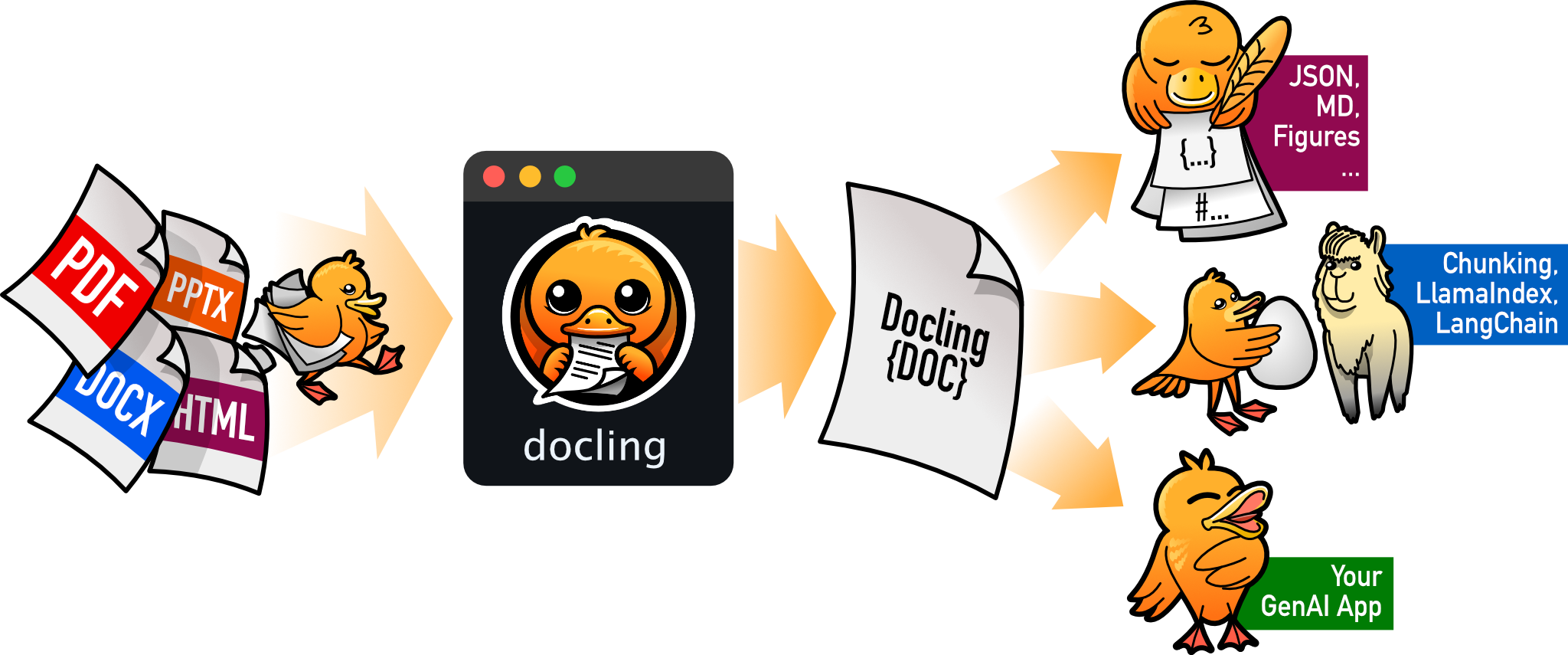
Docling is an open source toolkit built by the AI for Knowledge team at IBM Research Zurich. It was designed to solve exactly this problem: transforming complex documents into structured, machine-readable data that LLMs and vector search systems can actually use. Today, Docling is hosted under the Linux Foundation AI & Data, with an MIT license and fully local execution – no API key, no data sent to external servers. This is a critical point for companies processing sensitive documents or working in air-gapped environments. Furthermore, unlike most PDF extraction tools, Docling supports a wide range of file formats beyond PDF, making it a central component in any document processing pipeline.
Docling PDF and document formats: full extraction capabilities for RAG pipelines
Document formats supported by Docling
- PDF – with advanced page layout understanding, reading order, and table structure
- DOCX, PPTX, XLSX – full Microsoft Office support
- HTML and EPUB – web pages and e-books
- Emails (.eml, .msg) – archived mailbox parsing
- Images (PNG, TIFF, JPEG) – with built-in OCR for scanned documents
- Audio (WAV, MP3) – automatic transcription via ASR models
- XBRL – structured financial reports
- LaTeX – scientific and academic documents
Advanced extraction features that make Docling reliable for RAG
- Tables: extracted as actual rows and columns, not flattened text
- Mathematical formulas: preserved with their structure
- Charts: automatically converted into data tables or textual descriptions
- OCR: for scanned PDFs and image-based documents
- Reading order: preserved even in complex multi-column layouts
Docling native integrations with Python AI frameworks
Docling integrates directly with the major AI frameworks: LangChain, LlamaIndex, CrewAI, and Haystack. Additionally, it ships with a built-in MCP server, allowing any AI agent to call Docling directly as an external tool.
Installing Docling in Python: requirements and setup
Docling installs via pip. Requirement: Python 3.10 or higher (Python 3.9 support was dropped in v2.70.0).
pip install doclingThe first run downloads the required ML models, which takes a few minutes depending on your connection. Subsequent runs are near-instant, since models are cached locally. Importantly, Docling runs on macOS, Linux, and Windows in both x86_64 and arm64 architectures – which makes it compatible with most development and production environments. This is particularly useful when integrating Docling into an AI automation stack deployed across varied infrastructure.
Python example: converting a PDF with Docling into Markdown or JSON
Here is a minimal working example – three lines are enough to convert any document and get a clean output, ready to feed into your RAG pipeline:
from docling.document_converter import DocumentConverter

# Works with a local path or a remote URL
source = "https://arxiv.org/pdf/2408.09869"

converter = DocumentConverter()
result = converter.convert(source)

# Export to structured Markdown - ready for RAG chunking
markdown = result.document.export_to_markdown()
print(markdown[:1000])

# Export to JSON with full metadata
json_doc = result.document.export_to_dict()
# -> headings, tables, figures, reading order, page positions all preserved
To convert a local file, simply replace the source:
source = "/path/to/your/document.pdf"
converter = DocumentConverter()
result = converter.convert(source)
markdown = result.document.export_to_markdown()
As a result, the Markdown output preserves heading hierarchy (H1, H2, H3), tables in standard Markdown syntax, code blocks, and correct reading order – even on complex multi-column layouts. This is precisely what enables coherent RAG chunks and more accurate LLM responses downstream.
Building a RAG pipeline Python with Docling and LangChain
The most common use of Docling is feeding a RAG pipeline. Here is how to integrate it with LangChain and Chroma as a vector store:
from docling.document_converter import DocumentConverter
from langchain.text_splitter import MarkdownTextSplitter
from langchain_community.vectorstores import Chroma
from langchain_openai import OpenAIEmbeddings

# 1. Convert the PDF document with Docling
converter = DocumentConverter()
result = converter.convert("annual_report.pdf")
markdown = result.document.export_to_markdown()

# 2. Split into RAG-ready chunks
splitter = MarkdownTextSplitter(chunk_size=512, chunk_overlap=64)
chunks = splitter.split_text(markdown)

# 3. Index into the vector store
embeddings = OpenAIEmbeddings()
vectorstore = Chroma.from_texts(chunks, embeddings)

# 4. Semantic search across your documents
query = "What was the Q3 revenue?"
docs = vectorstore.similarity_search(query, k=3)
for doc in docs:
    print(doc.page_content)
In practice, chunking quality depends directly on parsing quality. With Docling, tables remain tables and sections remain sections – which significantly improves vector search precision and reduces LLM hallucinations in the final output. Moreover, this architecture pairs well with the n8n automation workflows we build at nir to automate document ingestion pipelines end-to-end.
Real-world Docling use cases for your Python AI projects
Enterprise knowledge base with Docling and RAG pipeline
You have hundreds of internal PDFs – technical manuals, procedures, reports. Docling converts them into clean Markdown, which you index in a vector search engine. Consequently, your teams can query the knowledge base in natural language through an LLM-powered interface. This is one of the most frequent use cases in the backend development projects we deliver at nir.
Automated financial PDF report analysis with Docling
XBRL and financial PDF reports contain complex tables that standard parsers destroy. Docling extracts tabular data with its full structure intact, ready for automated financial analysis or ingestion into a reporting pipeline.
Archived email processing in a Docling RAG pipeline
Docling parses .eml and .msg files natively. This means you can integrate email archives directly into a RAG pipeline or an automated classification system – without any additional preprocessing step.
LLM fine-tuning pipeline on proprietary documents
If you want to fine-tune an LLM on internal data, Docling outputs structured JSON compatible with standard training formats. This is, in fact, the original use case for which it was built at IBM Research Zurich.
Conclusion: using Docling in your AI automation stack
Docling solves a fundamental problem that every developer building AI applications encounters: input data quality determines output quality. No LLM, however capable, can compensate for context degraded by a poor parser. With an MIT license, fully local execution, and native integrations with LangChain, LlamaIndex, CrewAI, and Haystack, Docling is today one of the most solid open source tools in the document intelligence ecosystem. Moreover, its support for emails, audio, charts, and financial reports makes it far more versatile than any standard PDF library. At nir, we use Docling as part of our AI automation stack for clients who need to process large document libraries and build reliable RAG pipelines. If you have a similar project, get in touch with nir. To go further: read the official Docling documentation and explore the GitHub repository.